


The module «Лаборатории»allows the integration of the laboratory system
to Medlock: add laboratory tests to an appointment, form applications and pay for them.
The results of laboratory tests are automatically uploaded to the patient's electronic medical record in MedLock and transferred to the patient's personal account.
For the module to work correctly«Лаборатории», the following modules must be enabled: «Касса»and «Электронная медицинская карта».
Important! The results are not sent to the patient's email address, as this is an unsafe channel for sending and storing medical data. You can read more about this in the article Why the Medlock does not send the test results by e-mail.
The article contains sections:
- Connecting the module and sending a request to connect the LIS
- Filling out prices for laboratory tests
- Automatic price list loading
- Manual loading of the price list
- Uploading an Excel file with prices for laboratory tests
- Setting prices for laboratory tests manually
- Filling in prices for biomaterial collection
Connecting the module and sending a request to connect the LIS 
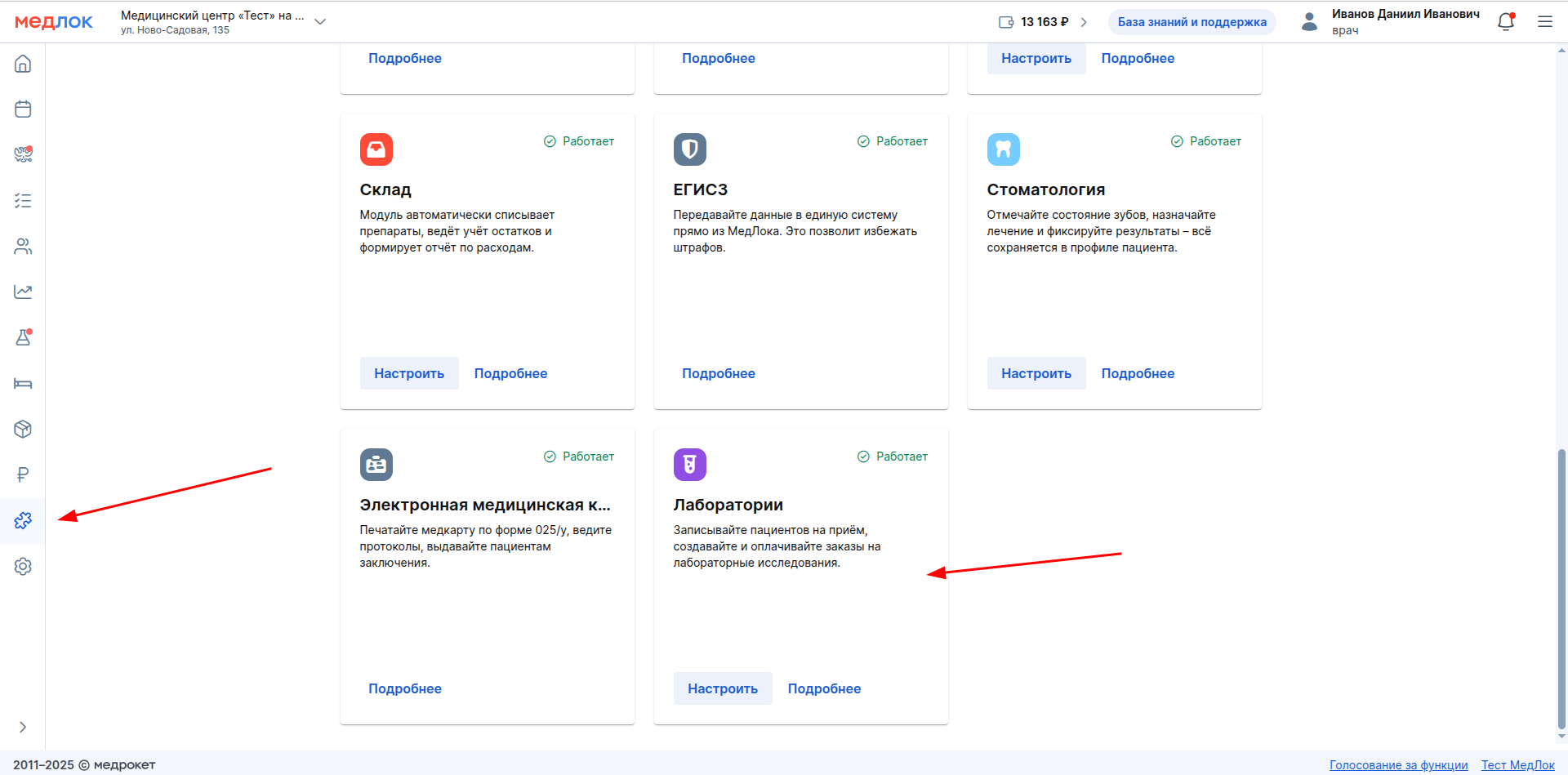
1. To connect the module«Лаборатории», go to the section «Модули»and click «Подключить».

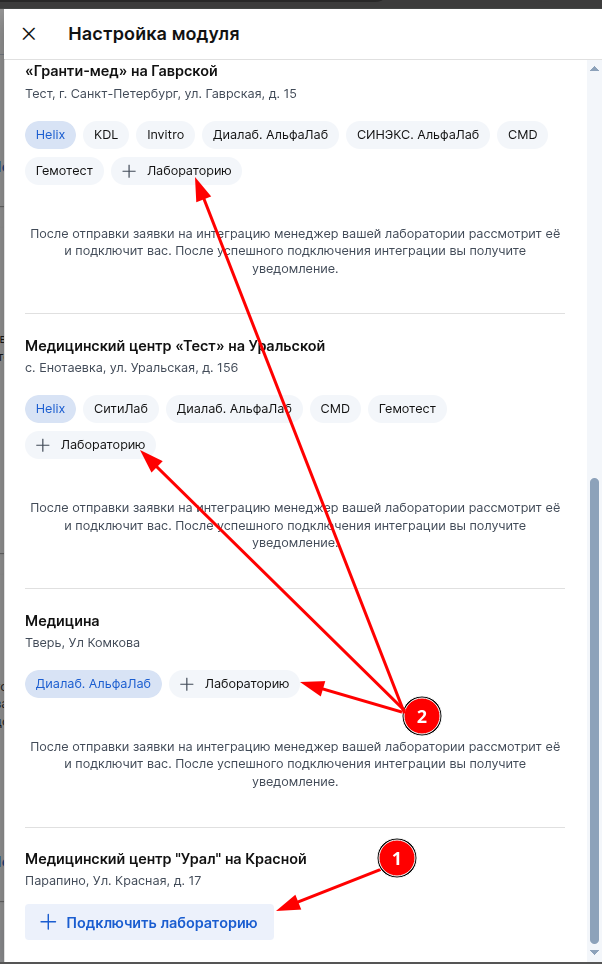
2. Select the branch to connect the laboratory to. If no laboratory is connected to the branch yet, press «+ Подключить лабораторию»(1). If you need to add another laboratory to the branch, press «+ Лабораторию»(2).
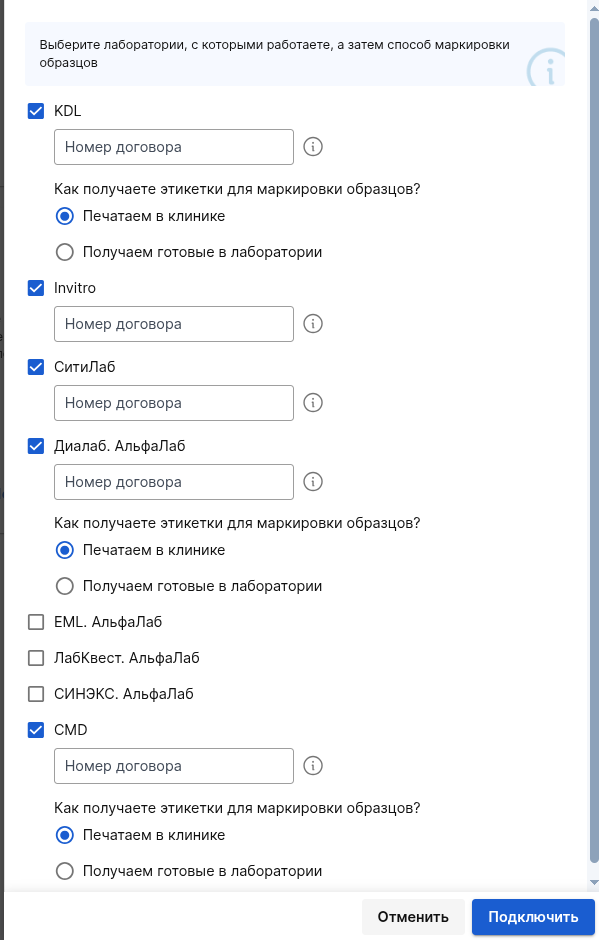
3. Select a laboratory from the list, enter the number of your contract with the laboratory, as well as the labeling method «Печатаем в клинике»«Получаем готовые от лаборатории»and click «Подключить».
The format of obtaining labels for each of the laboratories may differ, for example, for Invitro, «СитиЛаб», «Диалаб», «Гемотест»only the option is available «Печатаем в клинике».
After connecting to the laboratory, you have the opportunity to choose the format in which the order sheet will be generated — PDF or XLSX.

After changing the settings, all the already generated order sheets and all new ones will be in the selected format.
For«Гемотест»: in the application, you will need to specify the password from your personal account in «Гемотест».
Important! For «Гемотест»: If the password you entered is incorrect, the laboratory will not be able to connect you. To do this, you need to change your password in the submitted application, having checked it beforehand.
To check the password for relevance, try logging into your personal account«Гемотест»: if the authorization was successful and you logged in, the password is correct. This password must be entered in the corresponding field of the submitted application.
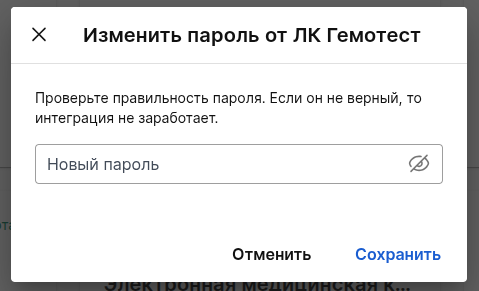
Go to «Модули»-> «Лаборатории»-> select the desired branch and click on the tab«Гемотест», then click «Изменить пароль от ЛК «Гемотест».
Important! You can change the password from the PC «Гемотест»via the Medlock only at the stage of sending the application to the laboratory. When the laboratory is already connected, the password can be changed through your personal manager.
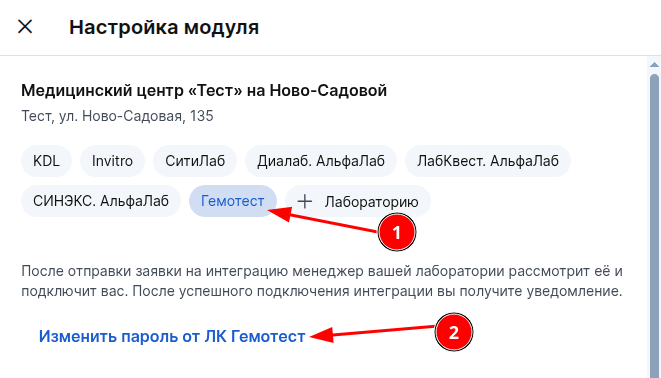
Enter the correct password in the field and click «Сохранить». Your connection request will be updated with the laboratory integrator.
The connection request will be automatically sent to the laboratory integrator, who will check it and connect you.
MedLock employees do not connect laboratories. For more information about this, see the Service article«Пульт ЛИС».
Important! After sending the application to the LIS, clarification on the terms of integration should be sent to your LIS manager.
Now you need to fill out the price list for laboratory tests.
Filling out prices for laboratory tests
Important! When integration is enabled in Medlock, all prices listed in the Laboratory Information System (LIS) are automatically adjusted.
Check the relevance of the price list. If the clinic's prices differ from those of the laboratory, you can specify them manually or import them from an Excel file.
When downloading the price list from the file, the studies themselves are not deleted or added, only their prices are updated. When you upload your price list, only the prices that are filled in the uploaded price list will be updated.
Important! If the clinic's price is set for the study, automatic updates from the LIS will not change it. The price of the clinic takes precedence over the price of the laboratory.
For «СМЛаб»: at the moment, not all analyses are supported in integration with «СМЛаб». The full list of analyses that are currently not supported can be found in the section Features of working with LIS «СМЛаб».
The laboratory transmits the list of studies to MEDLOCK (the list contains all the studies that the laboratory performs under the contract). When uploading an Excel file, the list of studies cannot change, only their price changes.
There are three ways to fill in the prices:
- use the price of the laboratory obtained from the LIS.
It is possible only if prices are available in LIS. - import prices from an Excel file;
- specify the price of the clinic manually, specifying the prices of each study.
How research prices are displayed
For each study, the «Цена»cost and its source are displayed in the column.
There are three possible options:
- Clinic price — the cost that the clinic has specified manually or downloaded from a file.;
- The price of the laboratory is the value received from the LIS;
Not specified — the cost of the study is missing.
If you click on the clinic's price, the Medlock will show the date the price was set and remind you that automatic updates from the LIS do not change this price.
If you click on the price of the laboratory, you can see the date of its last update from the LIS.
If there is no price, a «Не указана»warning icon is displayed next to the status. In the hint, you can edit the price or import the price list.
Choosing a price source
You can choose which price to use: the price of the clinic or the price of the laboratory.
Click on the price source in the research line and select the desired option from the list.
If the clinic's price is used, automatic updating of the price list from the LIS will not replace it.
If the laboratory's price is used, the cost will be updated along with the price list, which the laboratory transmits to Medlock.
Research search and filtering
Search and filters are available above the list of studies.
You «Источник цены»can use the filter to show the research separately.:
- Clinic price
- The price of the laboratory
- Not specified
The filter «Лаборатория»allows you to select the desired laboratory.
If one laboratory is connected under several contracts, each contract can be selected separately. It is displayed in the list in the format: Laboratory name (contract N)
Studies can also be filtered by category or found by name or code.
Automatic price list loading
When the price list is loaded automatically, the list of studies with prices will load within a few minutes.
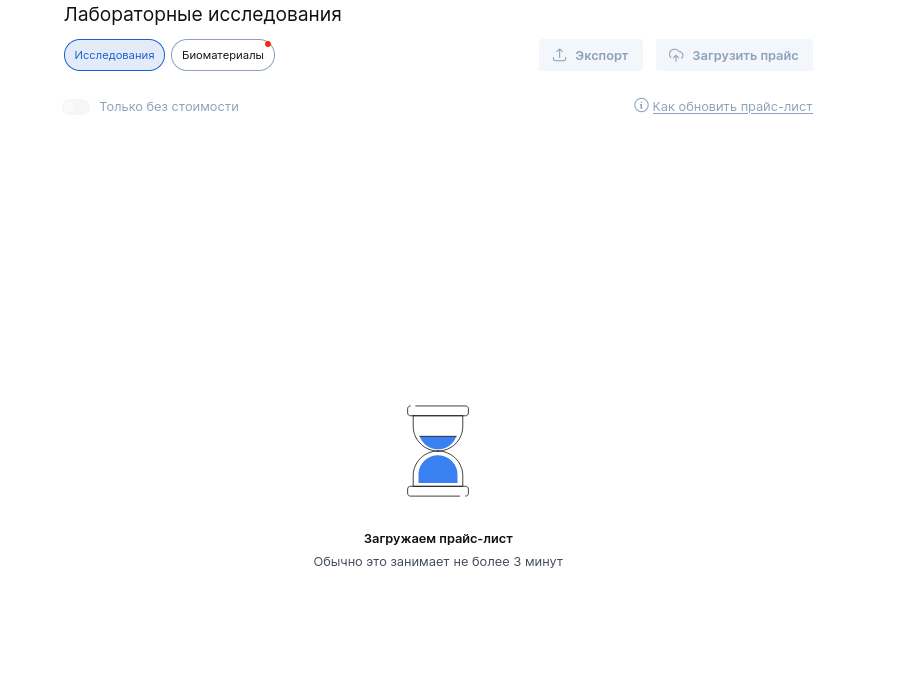
Prices from LIS are updated once a day. If the prices are specified manually using one of the methods below, then the price update from LIS will not affect your price list.
Important! Automatic updates only change the prices of the laboratory. The clinic's prices, which are specified manually or imported from a file, do not change.
Price update time from LIS (Moscow time)
- «Бион» — 02:00.
- «Гемотест» — 03:30.
- «СитиЛаб» — 05:00.
- Helix — 06:00.
- Invitro — 07:00 and 23:00.
- KDL — 13:00.
- CMD — 15:00.
- AlfaLab (DiaLab, LabQuest, SYNEX, SMLab, EML, Mobile Medical Lab, Litech, DNCOM) — 19:00.
Manual updating of the price list from LIS
If you need to get an up-to-date price list before the next automatic update, you can update it manually.
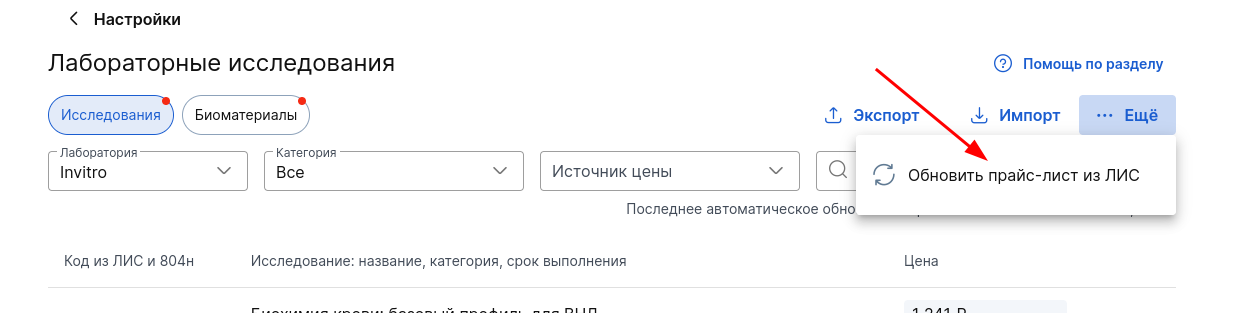
To do this, go to the «Модули»→ section«Лабораторные исследования», select the desired laboratory → click "...More" and click «Обновить прайс-лист из ЛИС».
After clicking, the Medlock will request an up-to-date price list from the laboratory. The update may take several minutes.
Important! For each contract, the price list can be updated manually no more than twice a day.
If the update limit is reached, Medlock will inform you that a second update will be available later.
If an update is already being performed for the selected agreement, you will not be able to launch another update at the same time. You must wait for the current update to complete.
Important! Manually updating the price list also does not change the clinic's prices, which were specified manually or imported from an Excel file.
If you need to update the price list
If there have been no orders under the laboratory's contract in the last 7 days, Medlock may suggest getting an up-to-date price list first.
Instead of a list of studies, a message will appear:
«Необходимо обновить прайс-лист»
and an explanation:
«Обычно это занимает не более нескольких минут».
Click «Обновить»to request an up-to-date price list from the LIS for the selected contract.
While the price list needs to be updated, some of the filters and actions with the list of studies may not be available.
Importing prices from an Excel file
If the clinic's prices differ from those of the laboratory, they can be downloaded from an Excel file.
To do this, click «Импорт»above the research table.
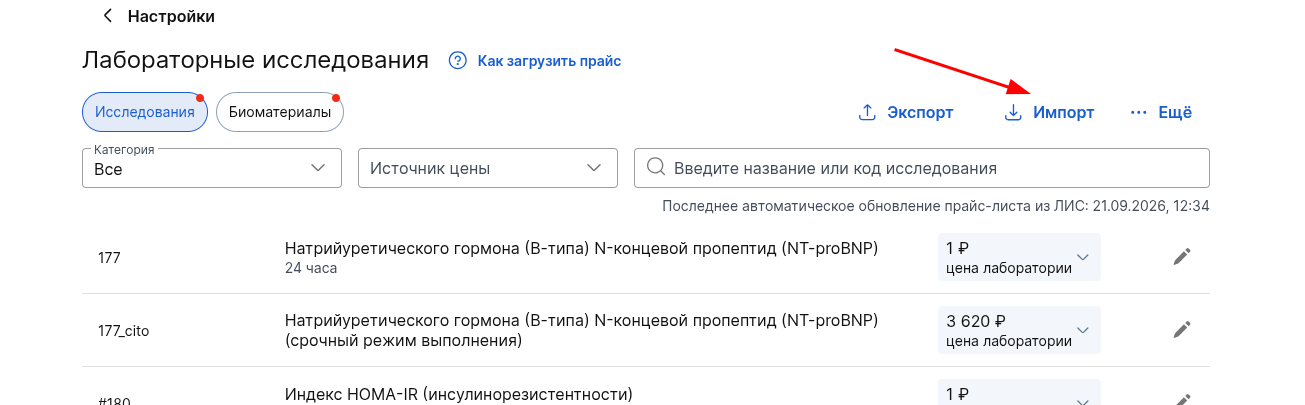
Make sure that the file meets the requirements and upload it.
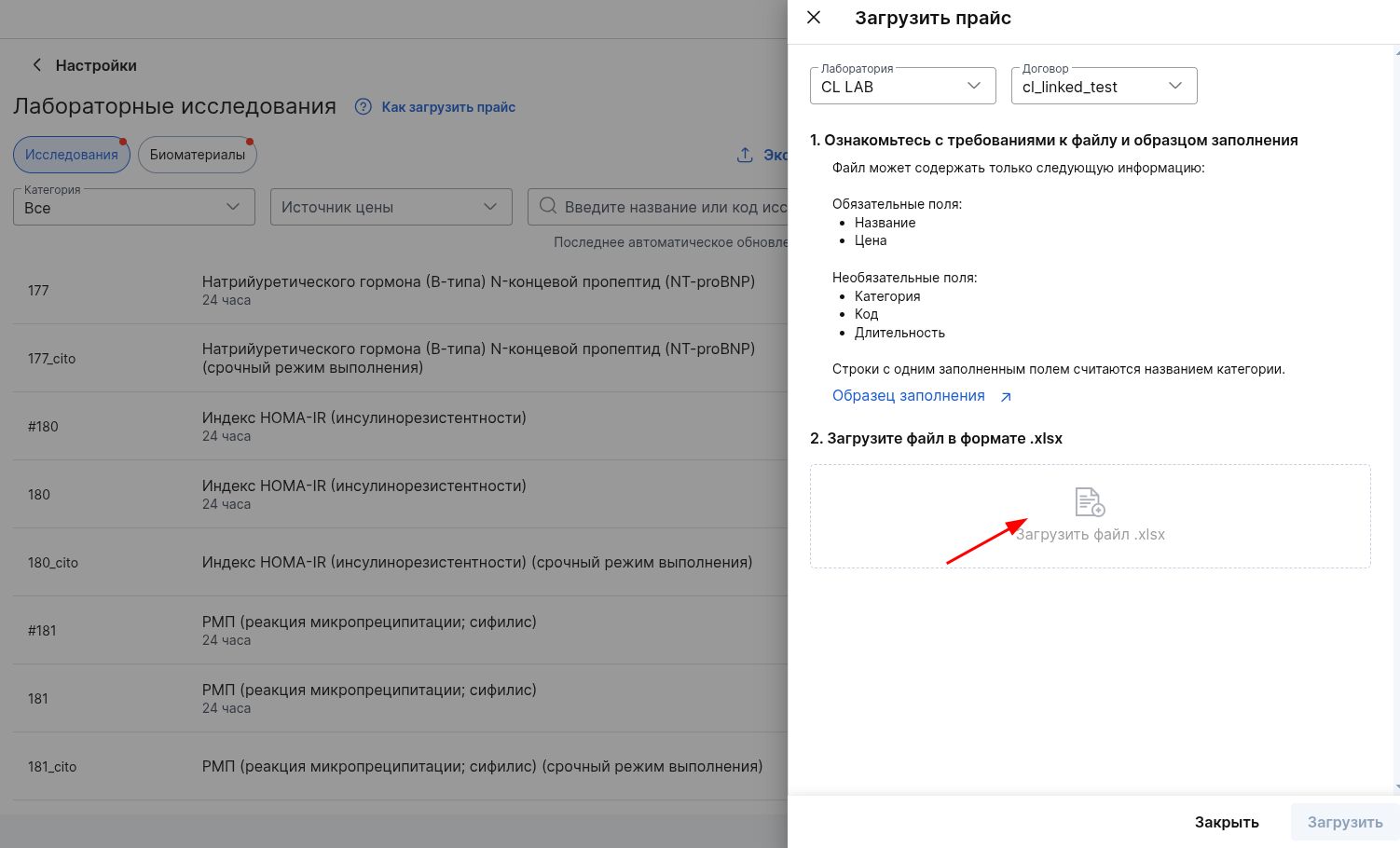
When importing, studies are not added or deleted. Medlock will only change prices for those studies that have been compared with the data from the file.
Important! In order for the price of the study to be updated, the name of the analysis or its code in the file must match the study in the MedLock.
If the same study is listed in the file several times with different prices, the MedLock will use the price from the last line with this study.
If the price you expected is not displayed after import, check the file for duplicate lines.
After import, this cost will be displayed as the price of the clinic. Automatic updates from LIS will not change it.
You can use the button to get a list of studies«Экспорт».
Setting prices for laboratory tests manually
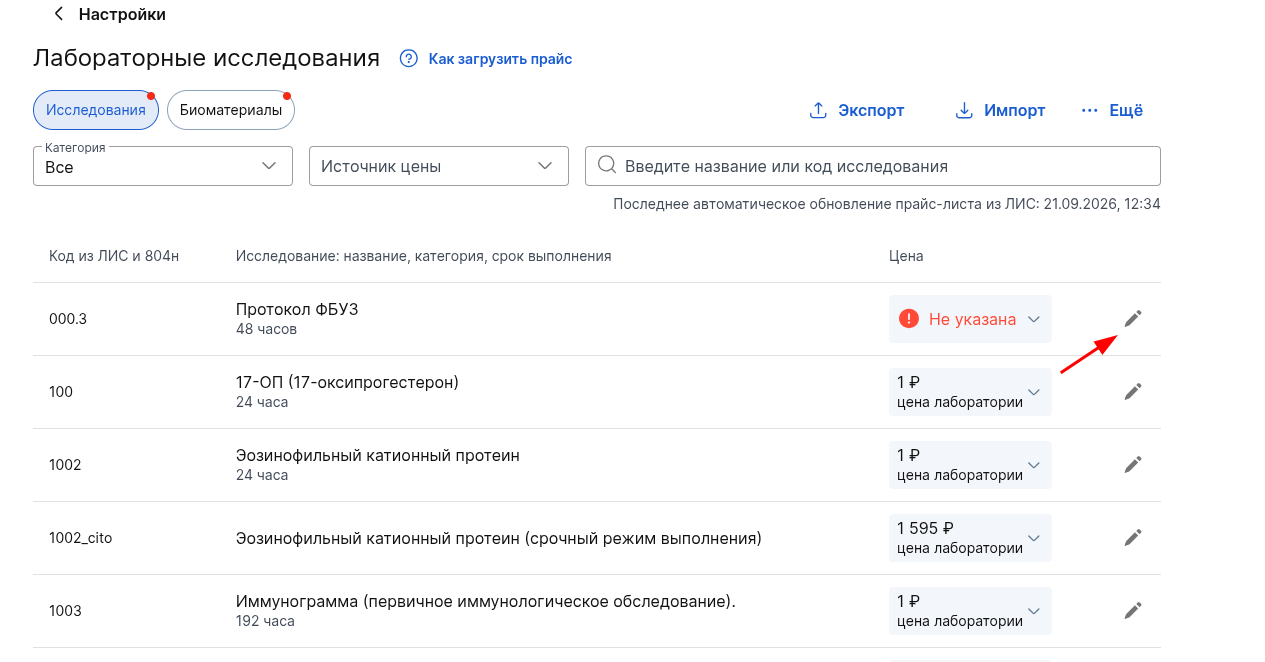
To specify the price for the study manually, click on the pencil icon next to the desired position.
In the window that opens, specify the cost. Click«Сохранить».
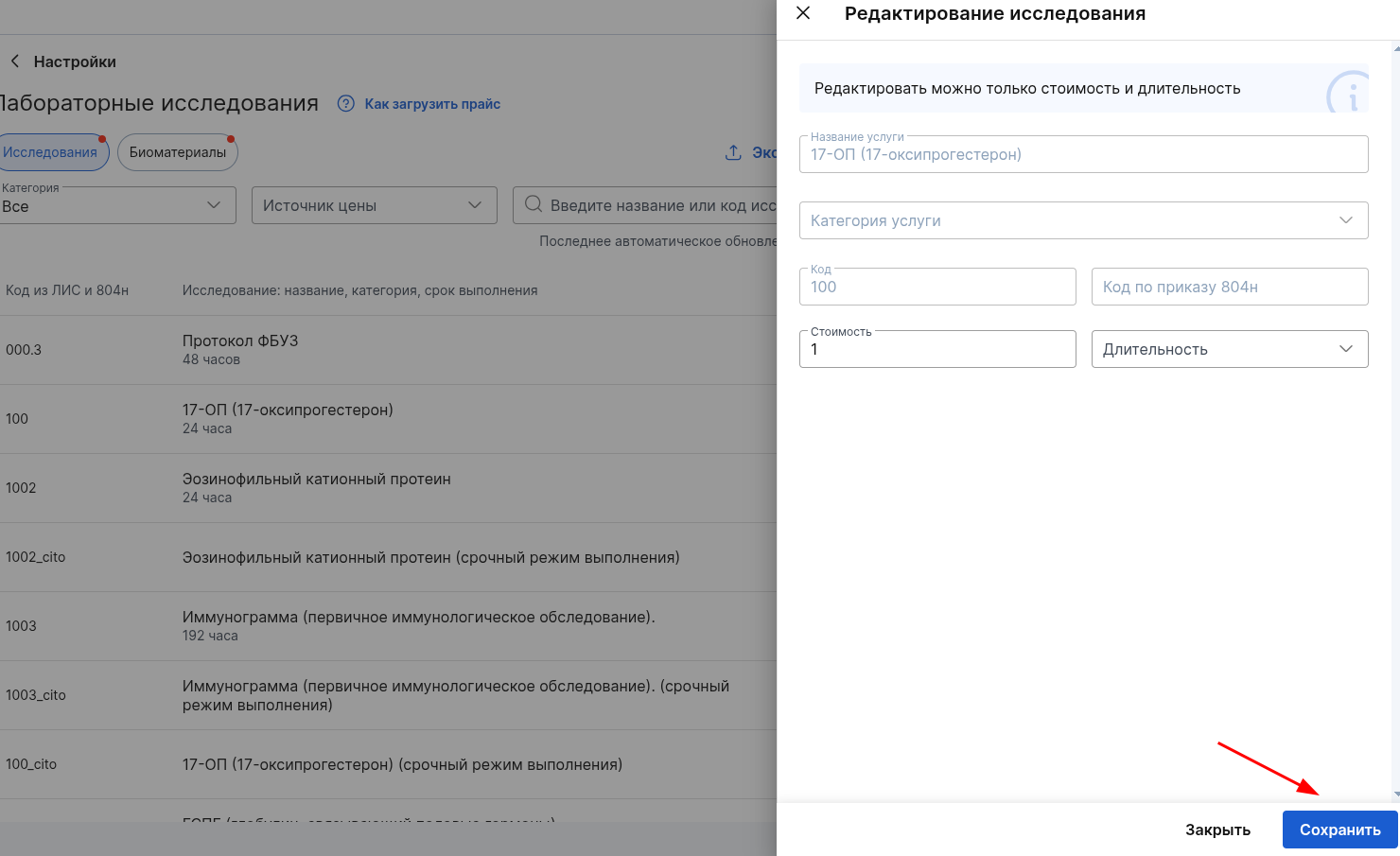
After saving, the cost will be displayed in the column «Цена»with the source«Цена клиники».
If the cost of collecting biomaterial is not included in the final cost of the study, fill in the prices for taking biomaterial separately.
Filling in prices for biomaterial collection
The list of biomaterials for research will be uploaded to the Medlock automatically.
You can specify prices for taking biomaterials if they are not included in the cost of research.
If the prices for biomaterials are filled in, the biomaterial collection service will be added to the order after adding the study (for example, «Анализ крови»venous blood collection will be substituted). If the FOX does not fill in the prices for biomaterials, then the services of its fence will not be included in the order.
Important! The clinic cannot choose the biomaterial collection services that should be automatically added to certain studies. This is set up by the laboratory itself for all clinics.
Prices for biomaterials can be imported from an Excel file or specified manually.
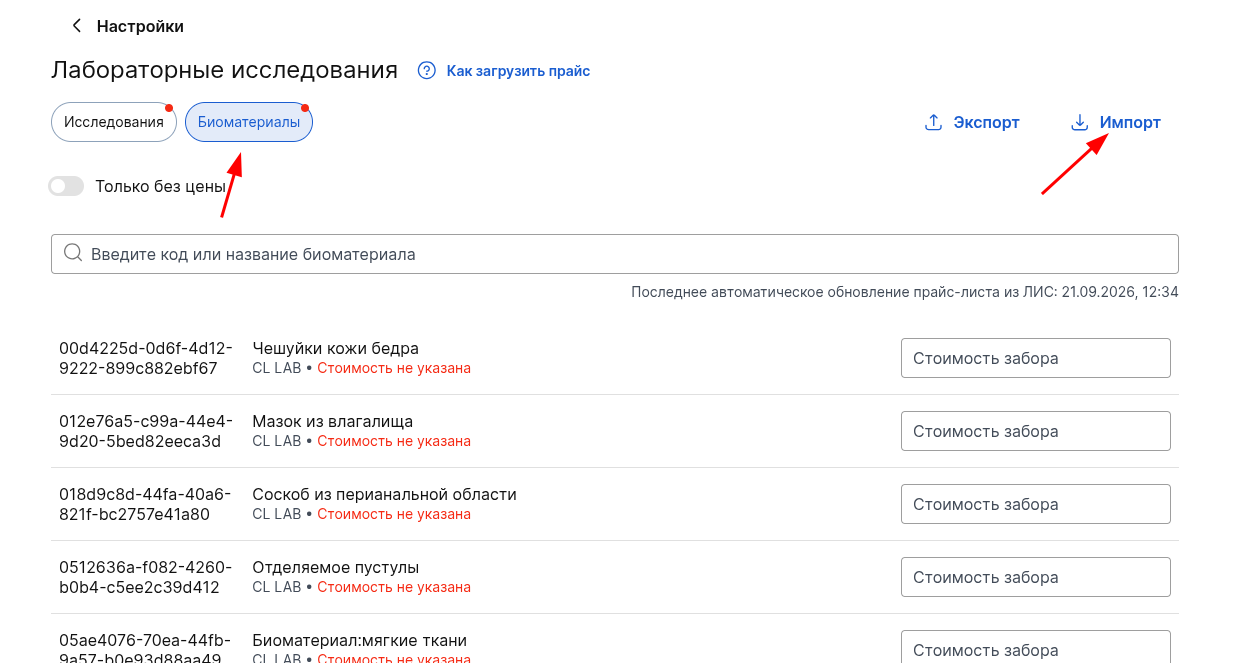
Or you can specify them manually.
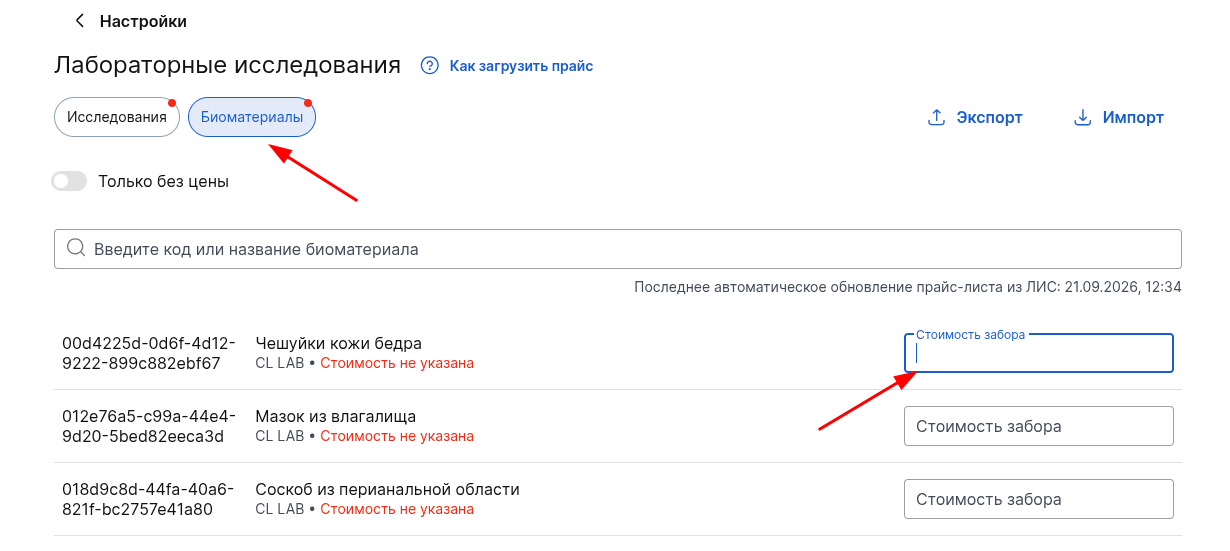
To find positions for which the price has not been filled yet, use the switch«Только без цены».
The date of the last automatic update of the LIS data is also displayed above the list.
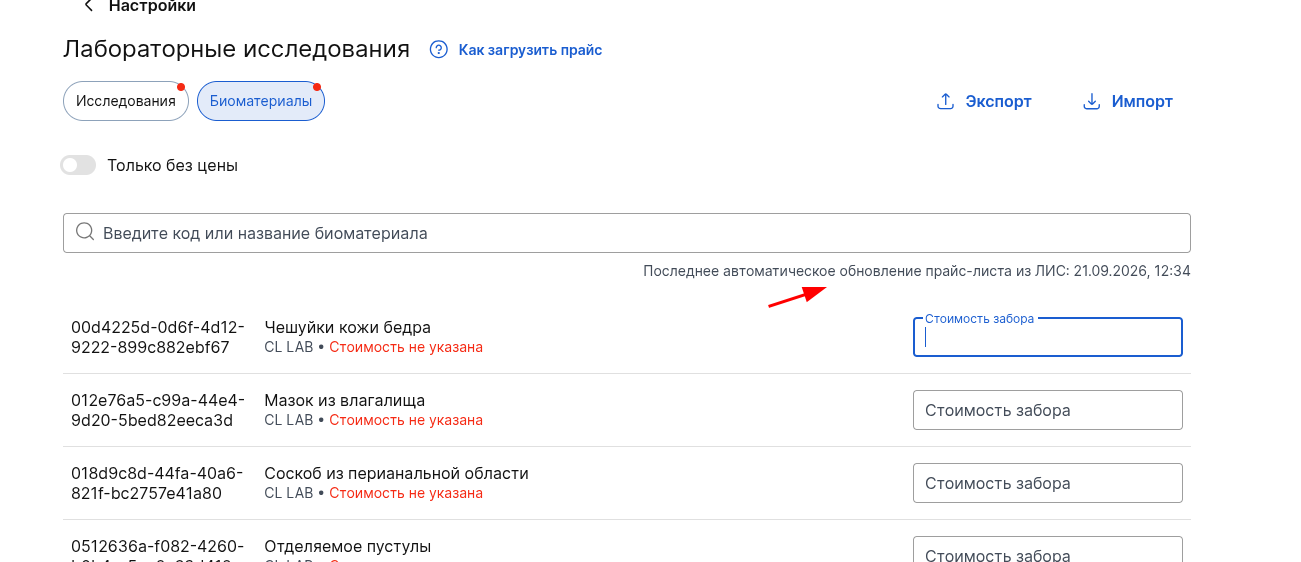
To download the list of biomaterials, use the button«Экспорт».

Important! Some laboratories (for example, «Гемотест») add several similar biomaterial collection services to the price list, depending on different studies (the color of the test tube differs). That is, if a patient has several blood tests in a laboratory order and samples of the same biomaterial have been added that differ only in the color of the test tube, this is not a mistake.