


Document Medical report on the absence of contraindications to certain sports (SAMD 152)
records the doctor's conclusion about the presence or absence of contraindications to certain sports in the patient: the type of sport, the conclusion itself, its validity period and the date of issue.
There is no approved form for this conclusion — the document is formed in a general form. After signing, the information is transferred to the EGISZ.
How to create a document 
- Make an appointment for the patient.
- Open the patient's card and check the profile data. Last name, first name, gender and date of birth, SNILS and region of the patient are required: signing will not take place without them. An identity document and an MHI policy do not interfere with signing — if this information is not available, it will not be transferred to the EGISZ and will not appear in printed form.
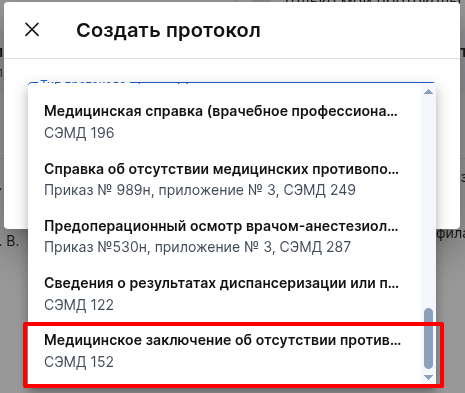
- Create a protocol«Медицинское заключение об отсутствии противопоказаний к занятию определенными видами спорта».
Filling out the document
- «Дата выдачи заключения» — mandatory for EGISZ. Specify the date on which the report is issued: it is printed in a line«Дата выдачи». It may differ from the document creation date.

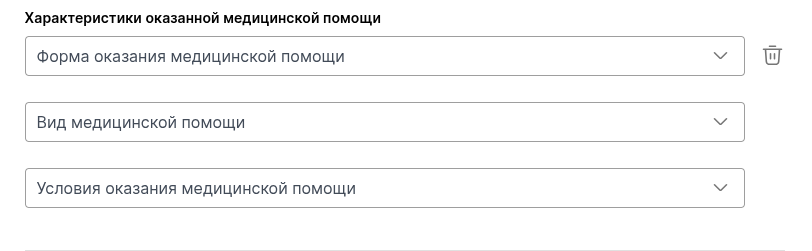
- The block «Характеристики оказанной медицинской помощи»transmits information about the medical care provided to the patient to the EGISZ. To open the block fields, click «Добавить».
- «Форма оказания медицинской помощи» — planned, emergency, or urgent.
- «Вид медицинской помощи» — select a value from the list, for example«Первичная врачебная медико-санитарная помощь».
- «Условия оказания медицинской помощи» — select a value from the list, for example«Амбулаторно, в том числе на дому при вызове медицинского работника».
All three fields are optional. If you leave them empty, the information will not be transmitted to the EGISZ.
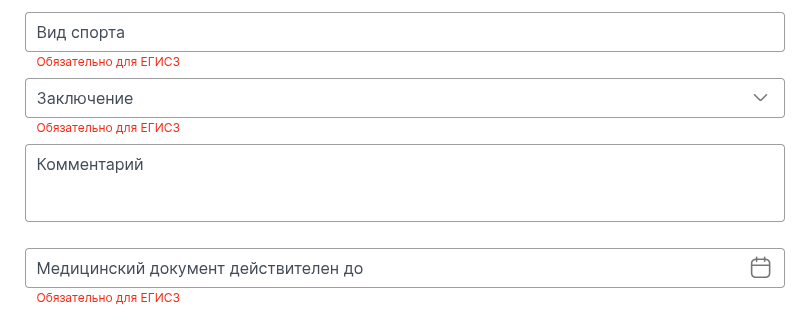
- «Вид спорта» — mandatory for EGISZ. The field is filled in manually, there is no list of sports. The text is transmitted to the Unified State Register of Legal Entities and printed exactly as you entered it: the spelling is not checked or corrected.
- «Заключение» — mandatory for EGISZ. Choose one of the two values: «Противопоказания к занятиям определенными видами спорта отсутствуют»and «Противопоказания к занятиям определенными видами спорта имеются»— the document is intended for this output only. None of the formulations names the type of sport, so specify the type of sport so that the conclusion reads unambiguously.
- «Комментарий» — optional field for doctor's explanations.
- «Медицинский документ действителен до» — mandatory for EGISZ. Specify the date until which the conclusion is valid: it is printed in the section«Срок действия».
- The block «Связанные документы»is optional: it contains information about other medical documents of the patient. To open the record fields, click «Добавить документ»; there may be several records.
- «Вид документа» — mandatory for EGISZ. Select a value from the list, for example «Направление на лабораторное исследование».
- «Примечание» — optional. In printed form, it is displayed in a separate paragraph under the line of the document.
- «Дата формирования документа» — mandatory for EGISZ.
- «Серия документа», «Номер документа», «Форма документа»— optional.
Pay attention. Information about the linked document is entered manually and is not linked to the document itself: a description of the document is transmitted to the USISZ, not a link to it.
Printed form
There is no approved form for this conclusion, so the document is printed in a general form. The final file is saved in PDF format.
They get into the printed form:
- information about the medical organization: name, address, OGRN, OKPO, OKATO, license and contacts;
- patient information: full name, date of birth and age, gender, compulsory medical insurance policy, SNILS, addresses — from the patient's card;
- «Вид спорта», «Заключение», «Комментарий врача», «Срок действия»and «Связанные документы»— from the document form;
- «Документ составил» and «Документ заверил»— the names and positions of the doctor and the certifier, «Дата выдачи»— from the form of the document.
Pay attention. In the current implementation, the author of the document is indicated as the certifier.
Signing and sending
The sign button remains inactive until all fields marked are filled «Обязательно для ЕГИСЗ»in. The rest of the checks are triggered when signing, based on data that is not on the form.
Important! To sign, the SNILS, position and place of work must be indicated in the profile of the doctor who drafted the document, and the medical organization must have the name and address with the street and the subject of the Russian Federation. If any of this is missing, the document will not be generated, and the system will indicate which information is missing.