


The document records the results of the medical examination or preventive medical examination: the type and period of the examination, the health group, the status of the medical examination, the diagnoses, the measured vital signs and the identified risk factors. After signing, the document is sent to the RAMD, and it can be printed at any stage of the work.
How to create a document 
- Make an appointment for the patient.
- To form the document, specify the data in the patient's profile:
- Last name, first name
- Paul
- Date of birth
- SNILS
- Residential address indicating the subject of the Russian Federation and the type of residence
- The type of compulsory medical insurance policy, the insurance company and its phone number — if the admission is paid for by compulsory medical insurance, VMI or at the expense of a legal entity
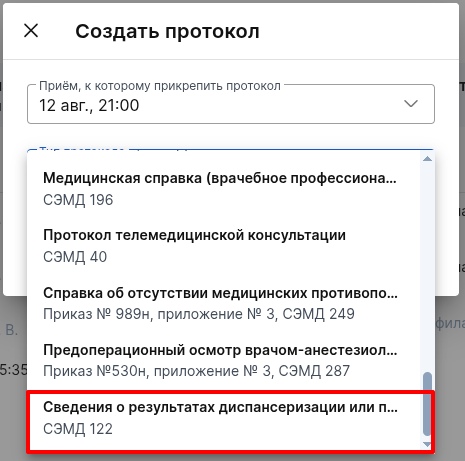
- Create a new protocol with the type «Сведения о результатах диспансеризации или профилактического медицинского осмотра».
Filling out the document
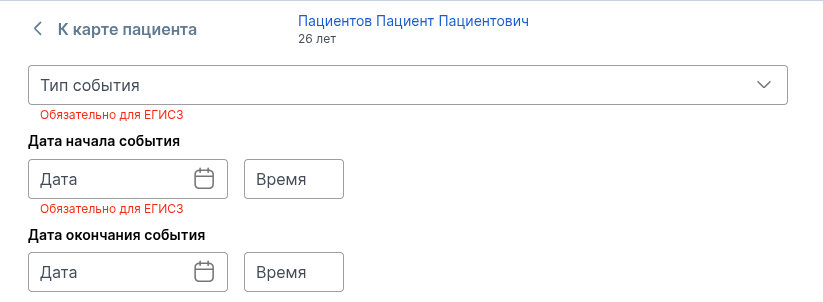
Type and date of the event
The block determines which kind of inspection you are performing and when it was performed.
Type of event
— select «Профилактический медицинский осмотр»or «Диспансеризация». There are no other values in the list: the document is intended only for these two types of inspection. Required for EGISZ.Event start date
— date and time of the start of the inspection. Required for EGISZ.Event end date
— optional field. If the inspection has not been completed or the date is unknown, leave the field empty: the document will contain a note about the absence of information, and a dash in the printed form.
Event Information
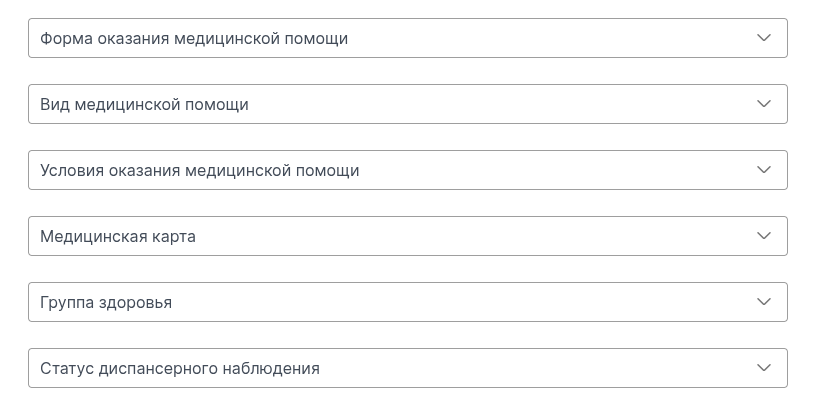
All fields are optional for the Unified State Register of Legal Entities. Fill in the ones for which you have data. The filled-in values end up in both the document and the printed form.
The form of medical care
— for example, a planned one.Type of medical care
— the type of assistance in which the examination was carried out.Conditions of medical care
— for example, outpatient.Medical card
— select a medical card from the list of patient's cards. The card number, type, and type will be substituted automatically for the selected card.Health Group
— select a value from the list.The status of dispensary observation
— for example,consists
orremoved
.
Pay attention. The section with information about the examination is always present in the document, even if the health group and the status of the medical examination are not filled in. In this case, a note about the absence of information will go into the document, and in the printed form there will be a dash in their place.
Diagnoses
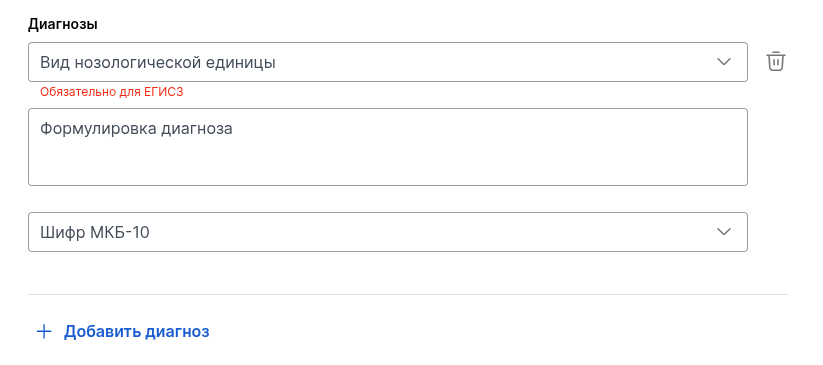
The document must contain at least one diagnosis — this is a mandatory requirement of the EGISZ. If nothing has been added, a prompt to add a diagnosis will appear when signing. You can add several diagnoses.
For each diagnosis, fill in:
Type of nosological unit
— what is this diagnosis based on the results of the examination: for example, «Основное заболевание»or «Сопутствующее заболевание». Required for EGISZ.Formulation of the diagnosis
— diagnosis in other words, without a code. The field is multi-line, optional.The ICD-10 cipher
— select a code from the classifier. Optional field.
Vital signs
The block is optional. Fill it out if measurements were taken during the examination — height, body weight, pulse, blood pressure and other indicators from the directory of vital parameters. There is no mandatory set of indicators: add what you have measured. If no dimensions are added, the section will not be included in the document.
One dimension is one record. Blood pressure is recorded in two separate records: systolic and diastolic.
In the added entry, fill in:
Date and time of measurement
— the date is mandatory for the USISZ, the time can be omitted.Vital indicator
— choose from the directory. Required for EGISZ.Meaning
—just a number. «высокий»The field does not accept text statements; the decimal part can be separated by commas. Required for EGISZ.Unit of measurement
— mandatory for EGISZ.Measurement condition
— optional field. Fill it in if the value was obtained under special conditions and it cannot be interpreted correctly without it: for example, a measurement after physical exertion.
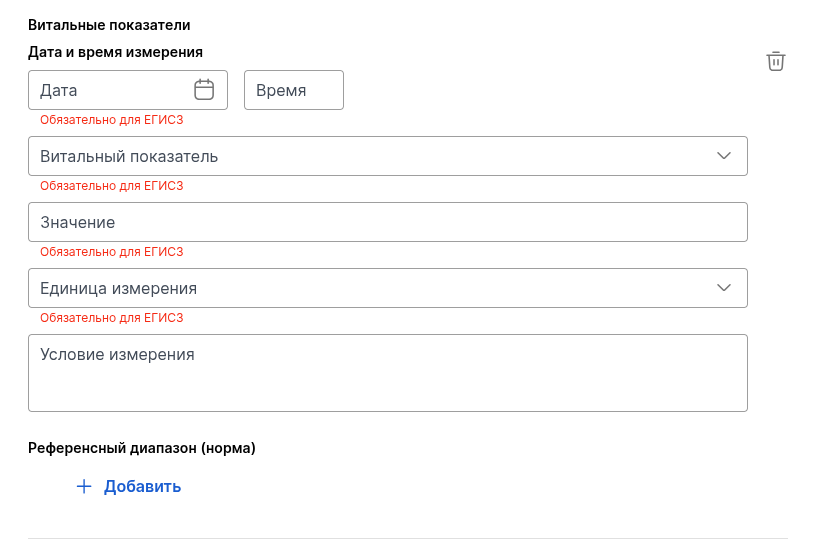
The reference range (norm) is an optional nested block. Fill it out if you need to show how the measured value correlates with the norm. If a block is added, the description of the norm, the lower and upper limits, and the unit of measurement of the norm are required for the Unified State Register of Legal Entities. The boundaries, like the indicator value itself, are just numbers.
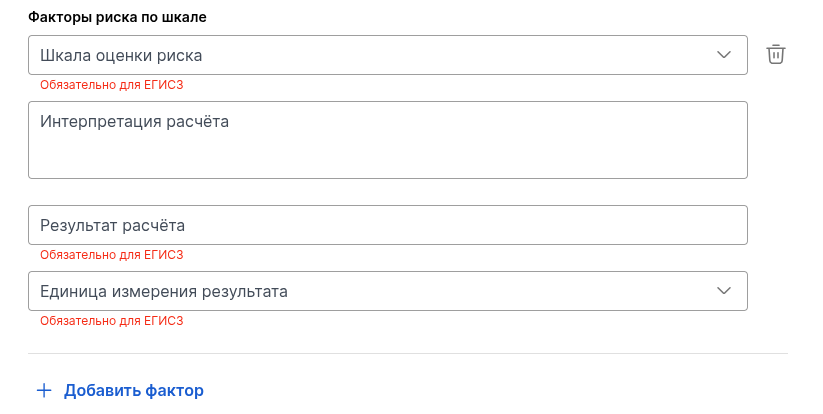
Risk factors on the scale
The block is optional. Fill it out if the risk has been assessed according to a clinical scale or questionnaire.
Risk assessment scale
— choose from the directory of clinical scales and questionnaires. Required for EGISZ.Interpretation of the calculation
— what does the score mean: the degree of risk to which it relates, or the conclusion on the scale. The field is multi-line, optional.Calculation result
—just a number. Required for EGISZ.Unit of measurement of the result
— mandatory for EGISZ.
Risk factors according to ICD-10
The block is optional. Fill it out if the identified risk factor is encoded according to ICD-10.
Risk factor (ICD-10)
— select a code from the classifier. Required for the Unified State Register of Legal Entities in the added entry.
Several factors can be added. It is enough to fill in any of the two lists of risk factors — according to the scale or according to the ICD-10, so that the section with risk factors is transferred to the EGISZ and appears in printed form.
Printed form
To print, click «Напечатать». The document will be generated in PDF format in a general form: there is no separate approved form for this document.
Printing is available on any filling, including an empty form. Only the completed sections are included in the form: if vital signs or risk factors have not been entered, the corresponding sections will not be printed. The section with information about the inspection is always printed, blank values are shown in it with a dash.
Signing and sending to EGISZ
Sign the document by clicking the button«Подписать». After being signed by the doctor, the document is signed by the head of the clinic in the section «ЭДО»or by an employee with the right to sign documents on behalf of the head. The document signed by the head is sent to the EGISZ.
Important! You will not be able to sign if there is not enough data that was not included in the document itself: information in the patient's profile, information about the medical staff who performed the examination, or the SNILS and positions of the document's author and certifier. The system will show you exactly what information is missing. Fill it out and re—sign.